Every phase of flight.
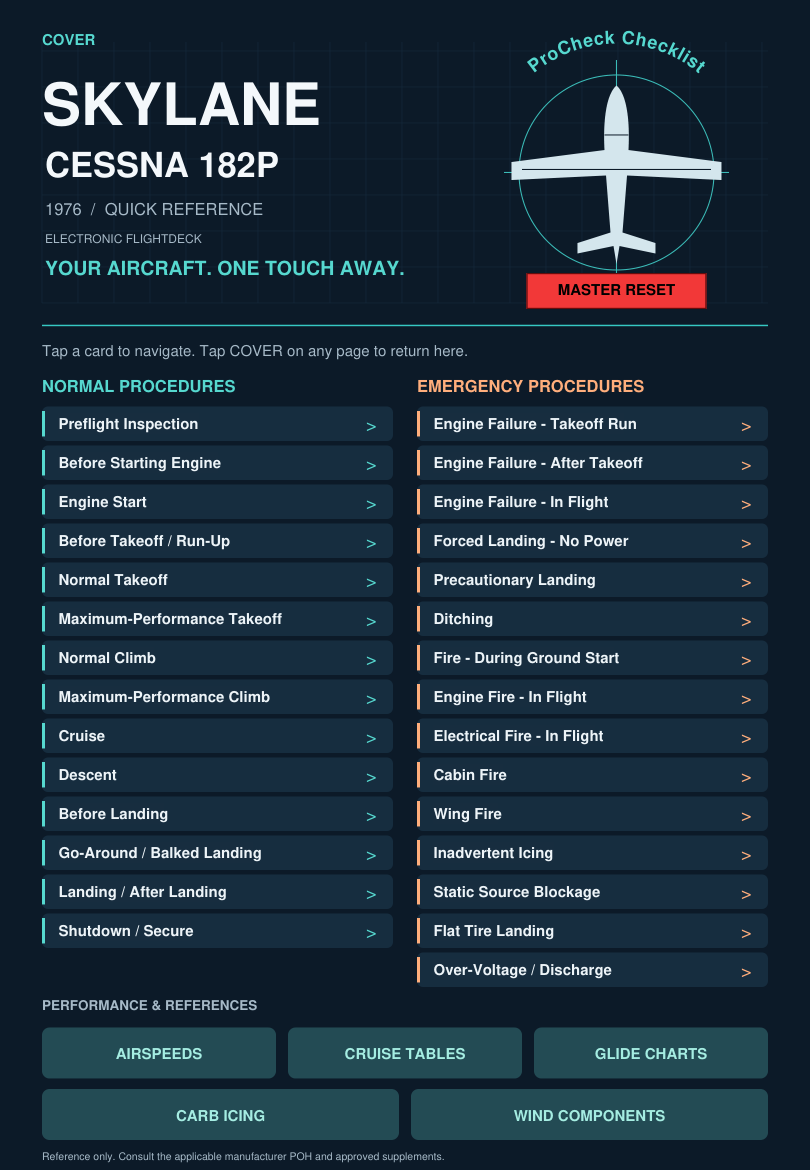
Preflight, engine start, run-up, takeoff, climb, cruise, descent, landing, and shutdown.
Watch the Engine Start demoNormal procedures, emergencies, and performance references. Built around the Skylane you fly.
A quick reference to use alongside the current manufacturer POH and approved supplements.
A paper checklist can slip between the seats, fall to the floor, or get left behind. Keep ProCheck Checklist in your EFB’s documents folder* so it stays with the device you already use for flight. * See Support tab for details.
Having procedures in a familiar place helps reduce the distraction of hunting for a loose checklist and supports an organized, consistent workflow on the ground and inflight. Download your copy for offline access before you fly.
From preflight to shutdown, with direct access to the procedure or chart you need.
Preflight, engine start, run-up, takeoff, climb, cruise, descent, landing, and shutdown.
Watch the Engine Start demoA dedicated index links to emergency procedures. Red emergency buttons return you to the index.
Airspeeds, cruise fuel burn and manifold pressure, glide planning, carburetor icing, and wind components.
Watch the animated cockpit walkthrough and Engine Start checklist demo.
These are pages from the current PDF. Select a view to explore the layout.
The website images are previews. The complete PDF is available with a purchase. Viewer support for checkboxes and reset buttons varies.
Get the checklistMajor Airline Captain
Line Check Pilot (LCP)

A pilot since age 16, Captain Justin Sinclair is a current Part 121 major airline Captain and Line Check Pilot. His experience spans decades of Part 91, Part 135, and Part 121 flying, with more than 9,000 flight hours using checklists.
ProCheck Checklist grew from a desire for one place to find the references needed for ground and inflight operations, presented in a clear, contemporary design.
That experience shapes a checklist built around human factors: readable information, a familiar procedural flow, and straightforward navigation. The goal is practical utility and ease of use, with safety at the center of every flight.
A purchase is required to download the complete Cessna 182P or Cessna 172M checklist. Once purchased, use your PDF in ForeFlight Documents or your preferred PDF viewer.
ProCheck Checklists have been tested for use in ForeFlight and Apple’s native PDF reader on iPad.
| Application | Compatibility | Status |
|---|---|---|
| ForeFlight | Tested—fully functional | Supported |
| Apple’s native PDF reader on iPad | Tested—works | Supported |
| Garmin Pilot Documents | Limited functionality; some interactive features may not work | Limited |
| FlyQ+ | Does not support the ProCheck checklist PDF | Unsupported |
Compatibility applies to ProCheck Checklists and may vary with application updates. Verify all checklist features on your device before flight.
ProCheck Checklists are fully functional within ForeFlight and are designed for use with Adobe Acrobat Reader and similar PDF readers that support interactive features. ProCheck Checklists can also be viewed using Apple’s built-in PDF viewer on the iPad.
Functionality varies by application. Interactive checkboxes, checklist resets, and navigation links may not work fully in some built-in document viewers, including the Documents viewer within Garmin Pilot EFB. Verify that all checklist features work on your device before flight.
All sales are final. Digital PDFs are nonreturnable and nonrefundable, except where required by law. Please review the compatibility information before purchasing.
For download or technical assistance, contact info@procheckchecklist.com.