ProCheck Checklist — Tap it. Check it. Reset it. — www.procheckchecklist.com
ProCheck Checklist

An interactive aircraft checklist built for cockpit use.

Tap it. Check it. Reset it.

Choose your airplane. Choose your format. Keep your checklist within reach—even without an internet connection.

A quick reference to use alongside the current manufacturer POH and approved supplements.

ProCheck Checklist Cessna 182P cover displayed on an iPad
CESSNA 182P / EFB PDF PREVIEW
ON YOUR EFB. WITHIN REACH.

No loose checklist.
No cockpit scavenger hunt.

Keep your checklist in your EFB. Download it for offline access before flight.

No misplaced card. No dropped paper. No searching the cockpit.

TWO FORMATS. ONE FAMILIAR FLOW.

Your checklist. Your way.

ProCheck Checklist comes in two separately sold versions: an Offline Checklist App for your phone, iPad, Android tablet, or computer, and an EFB Checklist PDF for use inside your EFB.

Both versions are available for the Cessna 182P and 172M. $19.95 per aircraft, per version.

VERSION 1 · STANDALONE APP

Offline Checklist App

A dedicated checklist with its own home screen or desktop icon. Download the checklist data during initial setup, then open it without an internet connection.

Ideal when you want direct access to ProCheck Checklist from your Android or Apple device.

Explore the offline app
VERSION 2 · EFB PDF

EFB Checklist PDF

An interactive PDF you import into ForeFlight Documents or open in a compatible PDF reader. Keep procedures and reference charts alongside your other flight documents.

Ideal when you want your checklist inside the EFB you already use.

Explore the EFB PDF

The app and PDF are separate purchases. Each $19.95 purchase includes one aircraft in one version.

YOUR OWN HOME SCREEN OR DESKTOP ICON

Offline
Checklist App

One initial setup with internet. After the checklist data has downloaded, no connection is required to use it.

Your 182P checklist. One tap from your home screen.

Tap the 182P icon to try the interactive checklist preview.
1

Download your checklist.

Connect once to download your aircraft’s checklist data to your device.

2

Add your ProCheck Checklist icon.

Keep it on your home screen or desktop so your checklist is easy to find.

3

Tap the icon. You’re in.

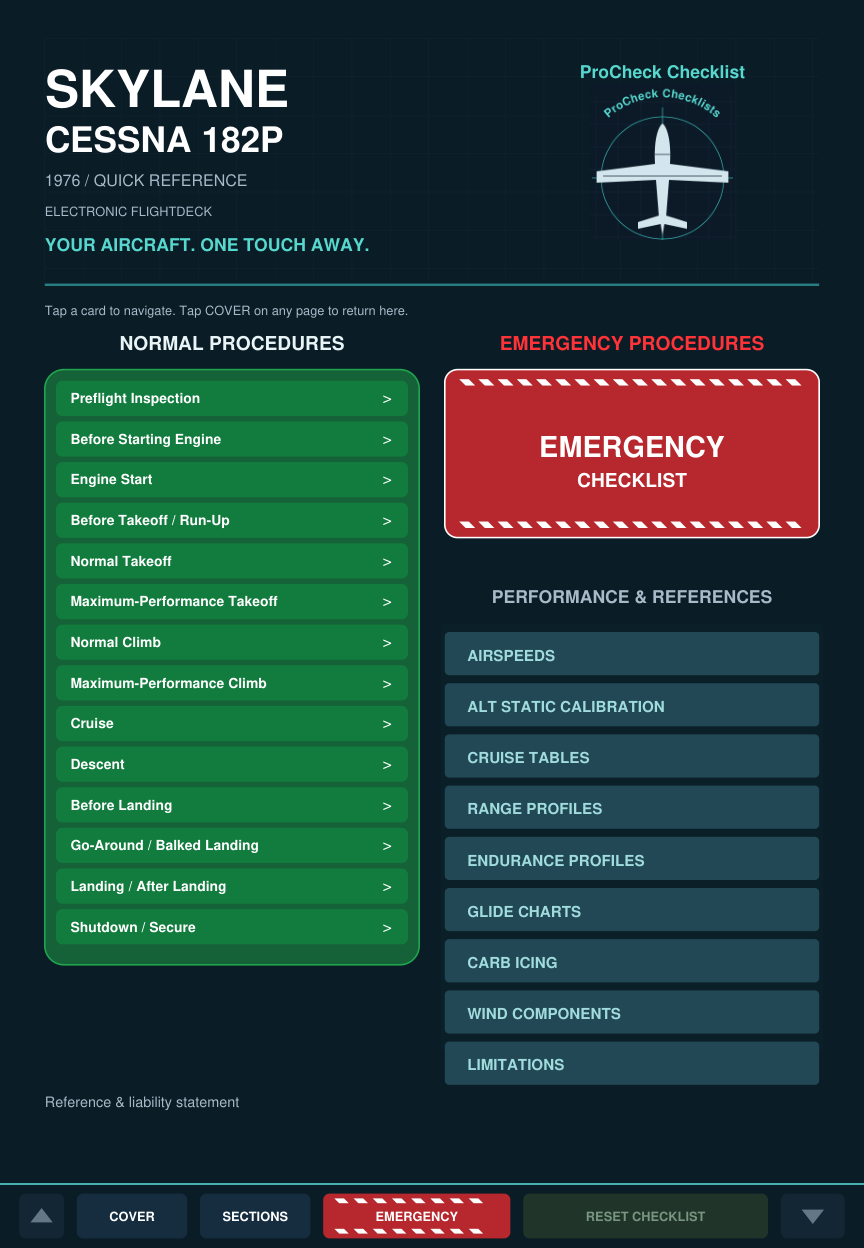
Use the green normal-procedure cards, red-and-white Emergency button, and performance reference links. Check tasks, track progress, and reset each checklist offline.

Your checklist goes with your device.

No loose card to misplace or drop. No connection required after the initial download. Open your installed checklist before flight to confirm it is ready.

Controls within reach.

Switch Day / Night, adjust text size, and use the bottom Cover, Sections, Emergency, Reset Checklist, and page-arrow controls.

Know which copy you have.

Version and release date appear at startup and below the reference statement on the cover. Ready offline includes the last download timestamp. When connected, an update notice lets you choose Update now or Later.

Internet is needed for the first download and any future updates. Keep the app’s downloaded data on your device for offline access.

EFB CHECKLIST PDF

Inside apps
like ForeFlight

Interactive checklist PDF for use in ForeFlight Documents and compatible PDF readers.

Keep ProCheck Checklist in ForeFlight Documents. Open your aircraft’s PDF, choose a procedure from the cover, and work through the checklist right where you keep your flight documents.

Black text and boxes show unchecked items. Tap a checklist item to turn its text, box outline, and checkmark green. Green progress bars show completion, and Reset Checklist clears the current page.

Use the red-and-white Emergency button to reach the emergency index. Cover brings you back to the main menu; linked reference pages keep charts close.

Choose your aircraft & PDFView the compatibility chart
ForeFlightDocumentsImported
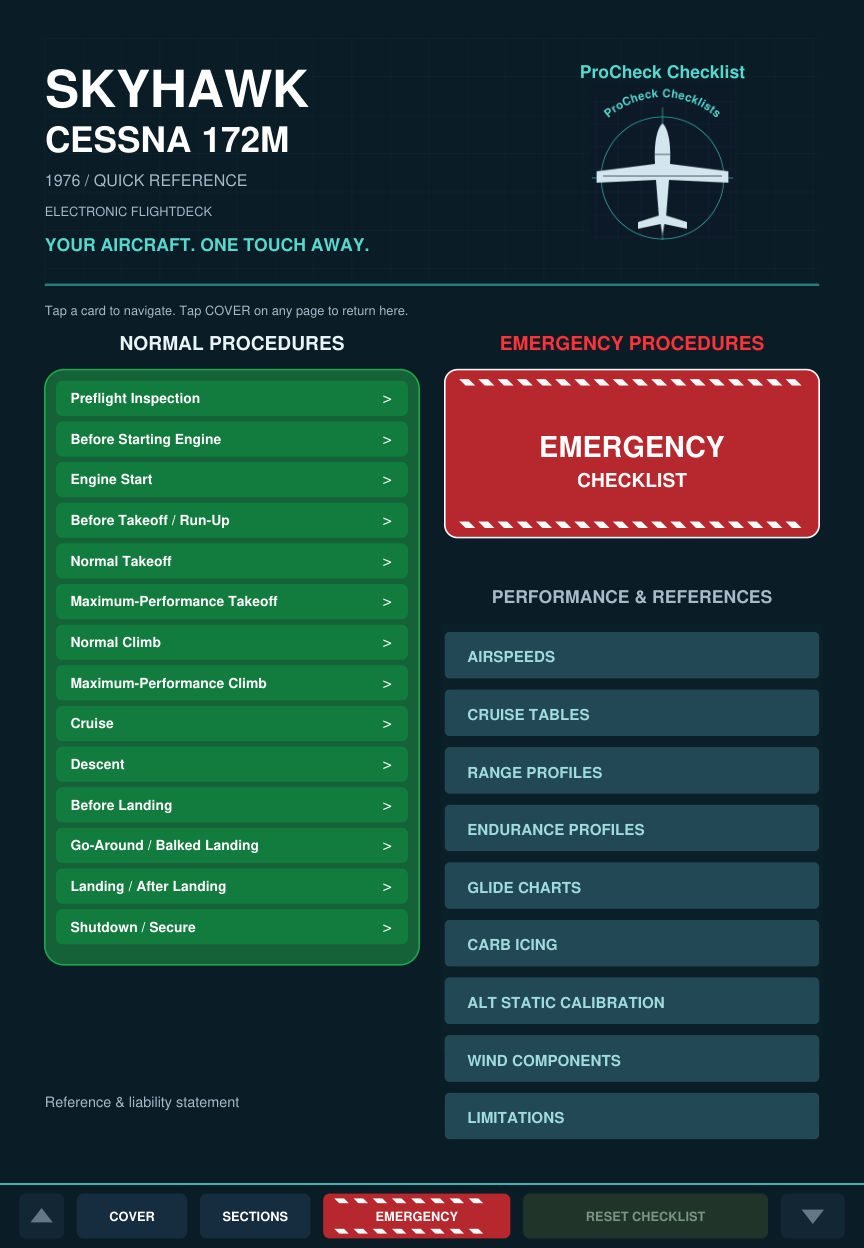
Final Cessna 172M ProCheck Checklist PDF cover displayed in an illustrative ForeFlight Documents layout
MapsAirportsDocumentsMore
Illustrative ForeFlight Documents view with the actual ProCheck Checklist PDF cover. App layout may vary.

ForeFlight is a trademark of ForeFlight. ProCheck Checklist is an independent product and is not affiliated with, sponsored by, or endorsed by ForeFlight.

1 / IMPORT

Save it to Documents.

Open your downloaded PDF on your iPad. Tap Share, choose ForeFlight (under More if needed), then select Documents to import it.

2 / OPEN

Choose your checklist.

In ForeFlight, open Documents and select your imported ProCheck Checklist PDF. Use the green Normal Procedures menu or the red-and-white Emergency Checklist button.

3 / CHECK

Tap it Check It Reset It

Tap items to mark them complete or tap again to uncheck them. Watch the green progress bar. Reset Checklist starts that page again.

Ready before you fly.

Download and open the PDF on your device before flight, then confirm you can open and use it with internet access turned off. A locally saved PDF is available offline. Interactive features depend on the reader; see the compatibility chart for other apps.

ForeFlight’s document import instructions
THE CHECKLIST

A familiar flow.
A faster way to find it.

From preflight to shutdown, with direct access to the procedure or chart you need.

01 / NORMAL

Every phase of flight.

Preflight, engine start, run-up, takeoff, climb, cruise, descent, landing, and shutdown.

Watch the Engine Start demo
02 / EMERGENCIES

Find the procedure.

A dedicated index links to emergency procedures. Red-and-white EMERGENCY buttons return you to the linked emergency index.

Linked emergency index
03 / REFERENCES

Keep the numbers close.

Airspeeds, cruise fuel burn and manifold pressure, glide planning, carburetor icing, and wind components.

Charts and performance tables
Try ProCheck Checklist

Tap it. Check it. Reset it.

Explore the Cessna 182P Engine Start sample.

TRY IT YOURSELF / CESSNA 182P

Engine Start, in your hands.

Explore the current app layout. Open a highlighted normal procedure, check items, reset progress, or try the Emergency and References navigation. Day / Night and text size controls work in this sample.

PROCHECK CHECKLISTReady in the cockpit.

Watch a lifelike cockpit scene: Engine Start, the ENGINE FIRE! alert, and the emergency checklist. Illustrative cockpit animation with a pilot and guided touch gestures.

Selected app procedures only. Layout based on app version 1.2, November 4, 2026. Sample progress lasts while this page is open. The purchased app includes offline installation and update notifications. Use the current manufacturer POH and approved supplements for operation.

LOOK INSIDE

See the checklist
before you purchase.

Explore the final Cessna 182P and 172M PDF layouts. Select an aircraft and view below.

The website images are previews. The complete PDF is available with a purchase. Both PDFs include linked cover menus, emergency indexes, completion tracking and page reset controls. Test these functions in your chosen reader before flight.

Get the checklist
Cover & Navigation PDF PREVIEW
Cessna 182P checklist cover
CHOOSE YOUR AIRCRAFT. THEN YOUR FORMAT.

Two airplanes. Four simple choices.

Every edition is $19.95. One aircraft and one format per purchase.

1976 / SKYLANE

Cessna 182P

Your aircraft. Two ways to keep the checklist close.

OWN HOME SCREEN / DESKTOP ICON

Offline Checklist App

Open normal procedures, the emergency index, and performance references from the app cover. Add its icon and download the checklist for offline use.

$19.95 one-time purchase
See how simple it isAvailable now · $19.95
INSIDE YOUR EFB / PDF READER

EFB Checklist PDF

Download your PDF into ForeFlight Documents or a compatible PDF reader. Keep it alongside your other flight documents.

$19.95 one-time purchase
Check reader compatibilityAvailable now · $19.95
Try the 182P checklist demo
1976 / SKYHAWK

Cessna 172M

Your aircraft. Two ways to keep the checklist close.

OWN HOME SCREEN / DESKTOP ICON

Offline Checklist App

Open normal procedures, the emergency index, and performance references from the app cover. Add its icon and download the checklist for offline use.

$19.95 one-time purchase
See how simple it isAvailable now · $19.95
INSIDE YOUR EFB / PDF READER

EFB Checklist PDF

Download your PDF into ForeFlight Documents or a compatible PDF reader. Keep it alongside your other flight documents.

$19.95 one-time purchase
Check reader compatibilityAvailable now · $19.95
Explore the 172M checklist
ABOUT US

Captain
Justin Sinclair

Major Airline Captain
Line Check Pilot (LCP)

Captain Justin Sinclair flying his Cessna with its modern instrument panel

Decades of experience.
One flight-focused checklist.

A pilot since age 16, Captain Justin Sinclair is a current Part 121 major airline Captain and Line Check Pilot. His experience spans decades of Part 91, Part 135, and Part 121 flying, with more than 9,000 flight hours using checklists.

ProCheck Checklist grew from a desire for one place to find the references needed for ground and inflight operations, presented in a clear, contemporary design.

That experience shapes a checklist built around human factors: readable information, a familiar procedural flow, and straightforward navigation. The goal is practical utility and ease of use, with safety at the center of every flight.

9,000+Flight hours using checklists
Since 16A lifetime in aviation
91 / 135 / 121Checklist experience across operations
SAME PRICE. YOUR PREFERRED FORMAT.

$19.95. Yours to use.

Choose the 182P or 172M, then the Offline Checklist App or EFB Checklist PDF. Each is a separate one-time purchase.

$19.95 USD eachOne aircraft · One formatAvailable nowCompare the four choices
SUPPORT

PDF Compatibility & Sales Policy

PDF Reader Compatibility

ProCheck Checklist have been tested for use in ForeFlight and Apple’s native PDF reader on iPad.

ProCheck Checklist PDF reader compatibility
ApplicationCompatibilityStatus
ForeFlightTested—fully functionalSupported
Apple’s native PDF reader on iPadTested—worksSupported
Garmin Pilot DocumentsLimited functionality; some interactive features may not workLimited
FlyQ+Does not support the ProCheck Checklist checklist PDFUnsupported

Compatibility applies to ProCheck Checklist and may vary with application updates. Verify all checklist features on your device before flight.

ProCheck Checklist are fully functional within ForeFlight and are designed for use with Adobe Acrobat Reader and similar PDF readers that support interactive features. ProCheck Checklist can also be viewed using Apple’s built-in PDF viewer on the iPad.

Functionality varies by application. Interactive checkboxes, checklist resets, and navigation links may not work fully in some built-in document viewers, including the Documents viewer within Garmin Pilot EFB. Verify that all checklist features work on your device before flight.

All sales are final. Digital PDFs are nonreturnable and nonrefundable, except where required by law. Please review the compatibility information before purchasing.

For download or technical assistance, contact info@procheckchecklist.com.

CONTACT US

Contact Us

info@procheckchecklist.com

End User License Agreement

Scroll to the end of the agreement before purchasing .

END USER LICENSE AGREEMENT & LIABILITY DISCLAIMER

Sinclair Aviation Services LLC d/b/a ProCheck Checklist

IMPORTANT: READ CAREFULLY BEFORE USING THIS PRODUCT.

This End User License Agreement and Liability Disclaimer (“Agreement”) is between you (“User” or “Purchaser”) and Sinclair Aviation Services LLC, doing business as ProCheck Checklist (“Company”).

“Product” means any ProCheck Checklist application, downloadable PDF, printed checklist, code, data, or related material supplied by the Company.

By actively selecting “I AGREE,” you acknowledge that you have reviewed this Agreement and agree to its terms. If you do not agree, do not proceed with purchase, download, installation, or use of the Product.

1. PILOT IN COMMAND RESPONSIBILITY & AUTHORITY

The User acknowledges that, pursuant to applicable Federal Aviation Administration regulations, including 14 CFR § 91.3, the Pilot in Command (“PIC”) is directly responsible for, and is the final authority as to, the operation of the aircraft.

The Product is provided strictly as a supplemental reference aid. It is not a substitute for proper flight training, sound pilot judgment, official aircraft documentation, or compliance with applicable regulations.

The User is responsible for verifying the Product’s procedures, limitations, performance information, and checklist actions against the current official documentation applicable to the specific aircraft, its equipment, and its modifications before operational use.

2. PRECEDENCE OF OFFICIAL AIRCRAFT DOCUMENTATION

The Product contains information relating to generalized aircraft models, types, and manufacturing years. It does not supersede, replace, or modify the applicable Airplane Flight Manual (“AFM”), Pilot’s Operating Handbook (“POH”), approved supplements, applicable airworthiness directives, or regulatory requirements.

In the event of any conflict, discrepancy, or inconsistency, the applicable official aircraft documentation and regulatory requirements take precedence over the Product.

The User must account for the aircraft’s actual configuration, installed equipment, modifications, operating conditions, and current documentation. Reliance on the Product contrary to applicable official documentation is at the User’s own risk.

3. DISCLAIMER OF WARRANTIES

The Product is provided on an “AS IS” and “AS AVAILABLE” basis.

To the maximum extent permitted by applicable law, the Company disclaims all warranties, whether express, implied, statutory, or otherwise, including:

• Implied warranties of merchantability.

• Implied warranties of fitness for a particular purpose.

• Warranties concerning the accuracy, completeness, currency, timeliness, or sequencing of information.

• Warranties that digital applications, files, or interactive features will operate without interruption, errors, data corruption, security vulnerabilities, or software defects.

• Warranties that every feature will function in every device, browser, electronic flight bag, or PDF reader.

The User is responsible for reviewing published compatibility information and verifying the Product’s operation on the intended device and application before flight, including offline availability, navigation, checklist selection, completion tracking, and reset functions.

Nothing in this Agreement excludes any warranty or consumer right that applicable law prohibits the Company from excluding.

4. LIMITATION OF LIABILITY

To the maximum extent permitted by applicable law, the Company and its members, managers, officers, employees, agents, and affiliates shall not be liable for direct, indirect, incidental, special, consequential, exemplary, or punitive damages arising out of or related to use of, or inability to use, the Product.

This limitation includes, to the extent legally permitted, claims involving death, personal injury, property damage, loss of data, loss of use, business interruption, or aircraft downtime.

To the maximum extent permitted by applicable law, the Company’s total cumulative liability for all claims arising out of this Agreement or the Product, whether in contract, tort, strict liability, or otherwise, shall not exceed the amount paid by the Purchaser for the specific Product license during the twelve months immediately preceding the event giving rise to the claim.

These exclusions and limitations do not apply to liability that cannot lawfully be excluded or limited.

5. INDEMNIFICATION & HOLD HARMLESS

To the maximum extent permitted by applicable law, the Purchaser and User agree to defend, indemnify, and hold harmless the Company and its members, managers, officers, employees, agents, independent contractors, and affiliates against claims, demands, lawsuits, losses, liabilities, damages, costs, and expenses, including reasonable attorneys’ fees and court costs, arising out of or relating to the User’s operational use of the Product.

Subject to applicable law, this obligation includes claims brought by the User, the User’s estate, passengers, passengers’ estates, insurers asserting subrogation rights, or other third parties alleging a defect, omission, or error in the Product or its operational use.

This provision applies only to the extent enforceable under applicable law and does not require indemnification where prohibited by law.

6. LICENSE & INTELLECTUAL PROPERTY

Subject to this Agreement, the Company grants the authorized Purchaser a limited, single-user, non-transferable license to use the Product for personal reference purposes.

The Purchaser may install or store the Product on devices used by that Purchaser and may print a copy for that Purchaser’s own use.

Except as permitted by applicable law or expressly authorized in writing by the Company, the Purchaser may not:

• Resell, sublicense, redistribute, or share the Product with other users.

• Publish or upload the Product for public or shared access.

• Copy or extract protected original content, artwork, layouts, or software for commercial redistribution.

• Use automated scraping or other extraction methods to reproduce protected portions of the Product.

These restrictions do not claim exclusive ownership of public-domain information, aircraft facts, operating methods, or third-party material that the Company does not own.

Fleet, flight-school, airline, and other multi-user use requires a separate written license agreement specifying authorized users, devices, and distribution rights.

7. SEVERABILITY

If a court of competent jurisdiction determines that any provision of this Agreement is invalid, illegal, or unenforceable, the remaining provisions shall continue in effect to the extent permitted by law.

Any invalid or unenforceable provision may be limited or modified only to the extent permitted by applicable law. If modification is not permitted, that provision shall be severed without invalidating the remaining Agreement.

8. GOVERNING LAW & JURISDICTION

This Agreement shall be governed by the laws of the Commonwealth of Virginia, without regard to its conflict-of-laws principles.

Subject to applicable law and jurisdictional requirements, any action arising from this Agreement or the Product shall be brought exclusively in the state courts located in Fairfax County, Virginia, or the United States District Court for the Eastern District of Virginia.

Nothing in this section overrides mandatory consumer protections or other rights that cannot lawfully be waived.

USER ACCEPTANCE

I have reviewed and agree to the End User License Agreement & Liability Disclaimer. I understand that ProCheck Checklist is a supplemental reference aid and that applicable official aircraft documentation takes precedence.

Company: Sinclair Aviation Services LLC d/b/a ProCheck Checklist

Contact: info@procheckchecklist.com

Scroll to the end to show Accept and Decline.

Cessna 182P · Interactive preview

Open Engine Start, check tasks, reset, and explore Emergency or References. Selected procedures only.